
How it works
Lead to closed, one move at a time.
Twelve steps a roofing or exterior job goes through in Axiom. For each one: what happens, whose move it is, and the proof that moves the job on. Your stages, owners and rules are yours to change; this is how a new company starts.
-
The lead comes in
From your website, a lead provider, a referral, door knocking or the phone. Every lead lands on the Lead Board with its source. Possible duplicates are flagged before anyone calls twice.
Whose moveOffice or lead managerMoves when: someone contacts and qualifies it.
-
Book the inspection
For a lead that comes in by hand, the office picks a time inside business hours and a rep; the address autocompletes with Google Places. Confirming the appointment turns the lead into an Opportunity, and the rep gets it. Coming With Rytela, web and provider leads will book themselves around rep calendars, drive time and the weather.
Whose moveOffice (manual leads)Moves when: the appointment is booked and confirmed.
-
Inspect on the phone
A five-step wizard: details, checklist, photos, summary, review & send. Every tap is saved on the phone first, so a dead zone on a roof doesn't lose anything. The report is a branded PDF with your logo and the rep's mobile number.
Whose moveSales repMoves when: the inspection is completed (Inspected), then the report is emailed (Inspection report sent).
-
Estimate, contract, signature
Build the work order from your own templates and contract prices. The homeowner signs on their phone from a link, or in person with the rep. A signed agreement moves the deal to Prospect. It does not create a job.
Whose moveSales rep, then the homeownerMoves when: the agreement is signed.
-
A manager approves the work
The manager sees the signed documents, deposits and an approval checklist, then approves (that creates the job at Approved) or returns it to the rep with a reason.
Whose moveManagerMoves when: Approve & create Job.
-
Clear the gates
If the job needs an HOA approval, a permit or financing, that gate holds the material and labor orders until a team member records the approval: the date, and who. A gate added after work started flags the job; it never undoes work.
Whose moveProject manager or officeMoves when: the approval is recorded.
-
Confirm measurements, order materials
Upload the EagleView report and check each number against it. Pick which structures are in the job. The material order builds from your order template, and it can't be sent until someone confirms the measurements. Send it to your supplier or vendor by email, or log a phone order.
Whose moveOfficeMoves when: the order is sent.
-
Schedule the crew
Create the labor order, put it on the calendar and send it to the crew as a link. The "ready to schedule" stage completes itself when the labor order has an install date.
Whose moveProductionMoves when: the labor order is sent and scheduled.
-
On the roof
The crew taps Start when they arrive and answers the arrival checks: hand-load, extra layers. Damaged decking goes in with a photo per sheet; the office approves it and the homeowner signs and pays the change order from their phone while the roof is open.
Whose moveCrew, then office, then homeownerMoves when: the work is completed with photos.
-
Closeout
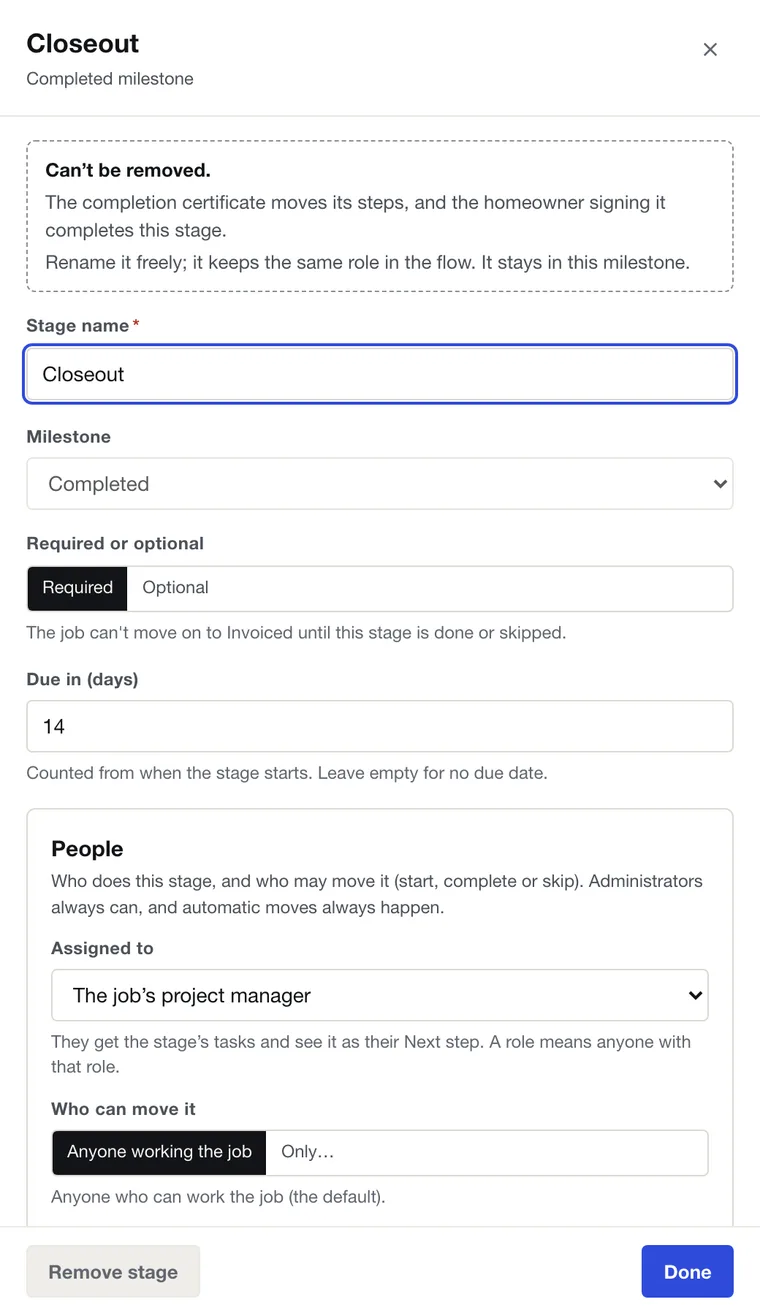
Completion photos, the punch list and the walkthrough. The homeowner signs the completion certificate. The crew's labor closeout is approved, and its payout goes on the pending ledger.
Whose moveProject manager, then the homeownerMoves when: the completion certificate is signed.
-
Invoice and get paid
Invoice from the job. The homeowner pays any amount by card or bank from a pay link, against one job balance, into your own Stripe account. Financing and lender fees land on the job cost.
Whose moveOffice / accounts receivableMoves when: the balance is paid in full.
-
Commissions, then closed
The advance commission can pay early. The final commission waits for the signed completion certificate and payment in full, and someone reviews it before it's paid. Then the job closes. Only a manager can close a job.
Whose moveManagerMoves when: final checks are done and the job is closed.
Make it yours
You decide the stages. Each one gets an owner.
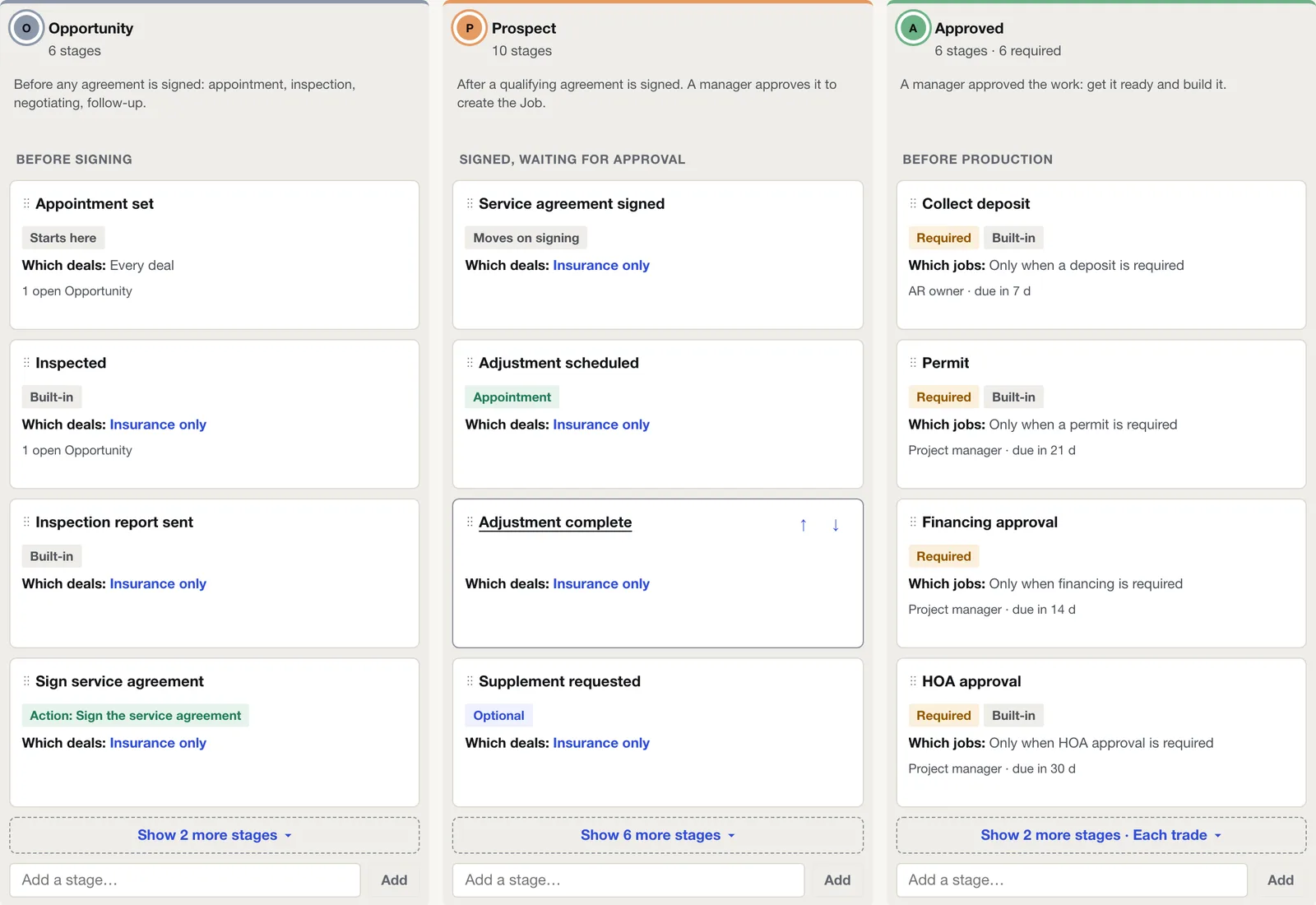
The stage editor lays out every stage by milestone. Open one to set who does it ("Assigned to") and who may move it ("Who can move it"). The person assigned sees it as their Next step.
- Stages for one trade only, or repeated for each trade on the job.
- Stages Axiom moves itself are marked, so nobody fights the system.
- Job stages go to a draft first. Publishing moves every open job to them and keeps its progress.
Founding Contractor pricingEarly access
See one of your own jobs run in Axiom.
Bring a real job: a lead, a signed contract, an install on the calendar. We'll walk it from lead to closed and show you whose move every step is. The first 50 contractors get Axiom Complete for $79 per user per month.Axiom Complete is per user per month, everything included.